Top 10 WiFi Hidden Camera Types for Legal Security Use
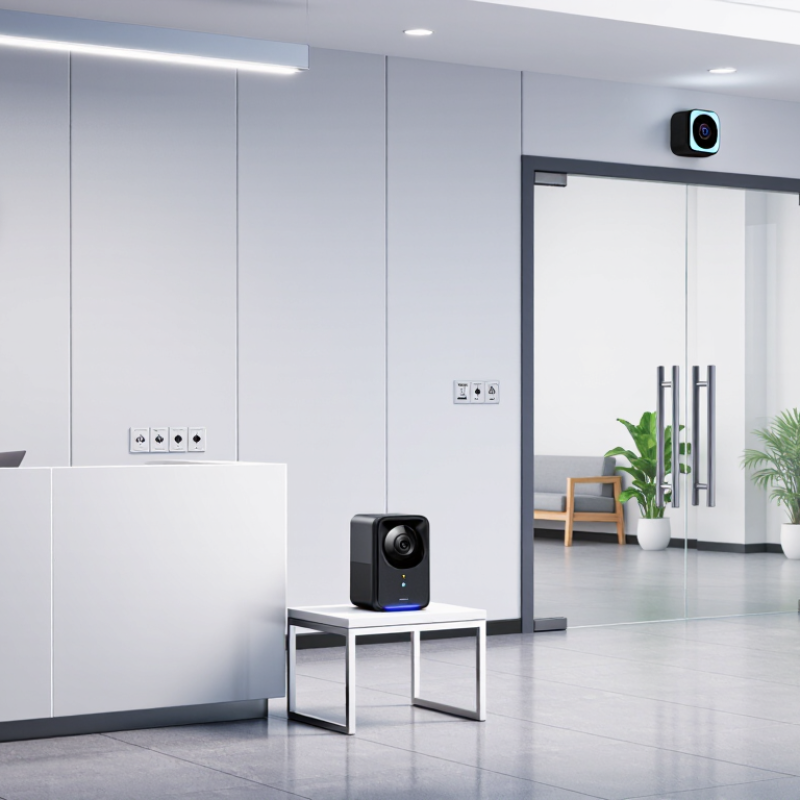
Choosing the right Wifi Hidden Camera for legal security requires more than comparing image quality or discreet design. This guide examines ten practical camera types for homes, offices, retail spaces, and other authorized environments. Each option is considered through placement, connectivity, storage, power, privacy, and everyday reliability. A compact camera beside a reception desk may monitor an entryway clearly, while a battery model can cover a temporary blind spot during approved maintenance work.
Legal use comes first. Camera owners should obtain permission where required, respect private areas, follow workplace policies, and check local rules before recording video or audio. Audio capture may have stricter requirements than video. Clear notices can also prevent confusion and build trust. Secure passwords, encrypted storage, firmware updates, and limited user access help protect recorded footage from unnecessary exposure. Small details matter, such as testing the WiFi signal behind a concrete wall or checking whether night vision reflects from glass.
Real experience shows that no camera fits every situation. A device with sharp video may still fail during a power outage. A cloud plan may simplify access but create recurring costs. Some specifications sound impressive, yet performance can change under real lighting. That deserves attention. The following overview offers balanced guidance, practical comparisons, and careful reminders for responsible deployment. It is designed to support informed decisions, not encourage secrecy without accountability. When privacy, consent, and security remain central, a Wifi Hidden Camera can serve as a useful tool within lawful protection plans.
Definition and Legal Scope of WiFi Hidden Cameras
Top 10 WiFi Hidden Camera Types for Legal Security Use
Definition and Legal Scope of WiFi Hidden Cameras
A WiFi hidden camera is a compact camera that transmits video through a wireless network. Its size or placement does not define legality. Purpose, location, notice, consent, and local law matter more. Legal security use may include protecting equipment, monitoring authorized work areas, or checking a permitted entry point. Private spaces, changing areas, bedrooms, and bathrooms require extreme caution. Audio recording often has stricter rules than video.
Professional guidance also emphasizes data protection. The 2024 Cost of a Data Breach Report placed the global average breach cost at 4.88 million US dollars. The 2024 Data Breach Investigations Report found that human involvement appeared in 68% of breaches. These figures show why strong passwords, encrypted connections, limited access, and automatic updates are essential. Store only necessary footage. Set a short retention period.
A compliant installation should document its purpose, camera angle, access list, and deletion schedule. Clear notices may be required, even when a device is visually discreet. Laws differ by country, region, workplace, and property type. Legal permission is not always ethical permission. A camera may be technically secure yet still feel intrusive. That boundary is easy to underestimate. Seek local legal advice before recording people, especially when audio, employees, tenants, children, or visitors are involved.
How WiFi Hidden Cameras Work and Connect
Top 10 WiFi Hidden Camera Types for Legal Security Use
How WiFi Hidden Cameras Work and Connect
WiFi hidden cameras come in several legal security formats. Common designs include plug-in adapters, clock-style units, smoke-alarm housings, and compact indoor modules. Their appearance changes, but the connection process remains similar. A lens sends light to a CMOS sensor. The image processor compresses the video before transmission. Most systems use H.264 or H.265 compression.
The camera then joins a 2.4 GHz or 5 GHz WiFi network through a router. The router assigns a local IP address. Encrypted data travels to approved storage, a local recorder, or a permitted viewing application. A 2.4 GHz signal usually reaches farther. A 5 GHz signal can provide better speed nearby. The State of IoT—Spring 2024 report estimated 18.8 billion connected IoT devices worldwide in 2024. That growth also increases network congestion and security concerns.
Use WPA2 or WPA3 encryption, unique passwords, and current firmware. Disable remote viewing when it is unnecessary. A strong signal does not guarantee clear footage. Walls, low light, and crowded channels still matter. In practice, setup is less elegant than product descriptions suggest. A simple connection test can reveal dropped frames before installation. Place cameras only in authorized areas, with required notice and consent.
Top 10 WiFi Hidden Camera Types for Legal Security Use
Representative image-resolution tiers for common WiFi-enabled security camera form factors. Actual specifications vary by model, lighting, lens, and network conditions.
WiFi cameras typically capture video locally and transmit compressed footage to a phone, recorder, or secure cloud service through a 2.4 GHz, 5 GHz, or dual-band connection. Use concealed cameras only where permitted by applicable privacy, workplace, residential, and recording laws.
Top 10 WiFi Hidden Camera Types for Security Use
WiFi hidden cameras can support legal security when installed on property you control, with clear consent where required. The ten common types include mini indoor cameras, plug-in cameras, smoke-alarm-style units, clock cameras, light-fixture cameras, door-view cameras, outdoor floodlight cameras, garage cameras, baby-monitor cameras, and temporary event cameras. Discreet does not mean invisible to privacy rules. Avoid bedrooms, bathrooms, and private areas. Check local requirements before recording audio.
MarketsandMarkets reported that the global video surveillance market could grow from about $53.7 billion in 2023 to $83.3 billion by 2028. Grand View Research also valued the global smart-home market at roughly $121.6 billion in 2023. These figures show strong demand, but growth can encourage rushed installations.
That is where my experience becomes cautious: a small camera may improve visibility, yet weak passwords, exposed cloud access, or poor placement can create new risks. Use encrypted WiFi, multi-factor authentication, firmware updates, and limited user access. Store footage only as long as necessary.
Tips: Choose a camera with status indicators, privacy controls, and local storage options. Test its viewing angle at eye level. Keep the lens away from neighbors’ windows. Document consent and retention periods. A privacy notice is often worth the extra effort. Some “hidden” designs look suspicious, even when used properly. Reconsider the placement.
Legal, Ethical, and Privacy Requirements
Top 10 WiFi Hidden Camera Types for Legal Security Use
Legal, Ethical, and Privacy Requirements
WiFi security cameras can include compact indoor units, outdoor weatherproof units, door viewers, smoke-detector style units, clock units, baby monitors, pet monitors, vehicle cameras, wearable cameras, and temporary construction cameras. Their size does not determine legality. Purpose, placement, notice, and consent matter more. A camera should protect property, not secretly observe private life.
Use cameras only in areas where monitoring is permitted. Never place them in bedrooms, bathrooms, changing areas, or other spaces where people reasonably expect privacy. Audio recording may require stricter consent than video. Check local regulations before installation, especially in shared housing or workplaces. Clear signs can help, but signs may not replace informed consent.
Keep a written security policy. It should explain the purpose, viewing access, storage period, and deletion process. Use strong passwords, encrypted connections, updated firmware, and separate user permissions. Store only necessary footage. Review access logs regularly. A locked cabinet helps protect local recording devices.
Good security work also includes honest limits. A hidden camera can be misaligned, hacked, or misunderstood. WiFi outages may create blind spots. Test coverage openly with authorized users, and document each test. I would avoid recording more area than needed, even when the law appears to allow it. Ethical judgment should remain stricter than the minimum rule.
Choosing and Installing a Compliant WiFi Camera
Choosing and Installing a Compliant WiFi Camera
A compliant WiFi camera should protect people without creating hidden privacy risks. Choose a model with clear status indicators, encrypted connections, strong access controls, and adjustable recording zones. Avoid placing cameras in bedrooms, bathrooms, changing areas, or other private spaces. A discreet design may suit a reception desk, storage entrance, or detached garage, but it should never be used to conceal surveillance from people who reasonably expect privacy.
Check local privacy and workplace rules before installation. Written consent may be required, especially when employees, tenants, visitors, or audio are involved. Audio recording deserves extra caution because some regions regulate it more strictly than video. Use visible notices that explain the camera’s purpose, recording area, and contact point. Keep the notice readable from the entrance.
Install the camera high enough to prevent tampering, but not so high that faces become unclear. Test the view during daylight and at night. Connect it to a separate, password-protected network, enable automatic updates, and remove unused accounts. Limit access to trained personnel and review login records regularly. Store footage only as long as necessary, then delete it securely. I have found that overly wide angles often capture neighbors or public walkways by mistake. Recheck the frame after furniture, lighting, or seasonal changes. Compliance is not a one-time setup.